Showing posts with label how to. Show all posts

Thursday, July 12, 2012

4 great Disneyland tips

I'm actually kind of shocked that I haven't written a post about visiting Disneyland. Before I became a professional organizer, I had an annual pass to Disneyland for several years, but I haven't gone as much lately. It is one of my favorite destinations and a great place to spend a few hours or a few days.

I have my own Lelah-patented method of "doing Disneyland" that I've perfected over dozens of visits. It maximizes the time I spend on my favorite rides and activities and minimizes time waiting in line. What works for me doesn't work for everyone, as every family has its own unique Disneyland approach. Even so, I do think I have some useful tips for just about anyone visiting the park.

Me, my brother and my dad at Disneyland circa 1986.
  1. Do utilize the FastPass option. FastPass is a way to spend less time in line for the best rides, but you have to be careful to return at your designated time, and you can only get one at a time. To get the most out of FastPass, be sure to get one for the busiest rides (Raiders, Space Mountain) early in the day, because sometimes the FastPasses run out. Also, don't be afraid to send one envoy with everyone's tickets to get all the FastPasses for a given ride while the rest of the group is doing something else.
  2. If you pass a ride and the line looks short, but you were planning to do it later, just go on it now. You will hate to come back and see the line is much longer than before. Good spontaneous rides and usually short waits: Jungle Cruise, Pirates of the Caribbean, Winnie the Pooh.
  3. Feeling hot and tired? Take a break in the Tiki Room, on the train, or even on Pirates of the Caribbean, which is the longest ride in the park and nice and cool.
  4. Don't go in the gift shops. You don't need anything in there and you'll have to carry whatever you buy around all day. But, if you do want something like Mickey ears or a hat, get that early so you can enjoy it all day long.
I feel like I could go on an on...perhaps there is a follow up post in the cards. In any event, the next time you make the trip to the happiest place on earth, have a spectacular time!

Tuesday, April 10, 2012

The best way to fold a shirt?

There are a bunch of videos online demonstrating how to fold a t-shirt in the Japanese style, that should take about two seconds once you get the hang of it. It's fun to watch the short Japanese version of the videos, but kind of hard to figure out what to do.


I was skeptical of a video titled How to Fold a T Shirt in 2 Seconds that's two and half minutes long, but it actually is the one you want to watch if you want to be able to do this nifty folding trick yourself.

Monday, January 9, 2012

Baking tips

I'm an avid baker and over the years I've developed some strategies that help me keep the guesswork out of baking and increase my enjoyment of it. Not surprisingly, these strategies keep me organized as I bake, so I feel in control and get better results from my recipes!


Here are a few tips from my kitchen, and a recipe that I love.
  • I always get out all of the ingredients I will need at once before I start anything, that way I can see if I'm missing anything.
  • Then, as I finish using an ingredient, I put the rest of the item away. This might seem like an extra step, but it helps me see if there is anything left on the counter when I think I am done, so I can tell if I've accidentally left an ingredient out.
  • Using the correct temperature butter, eggs and other dairy products usually does affect the outcome of a recipe. I always try to plan ahead and pull those items out of the fridge early if they need to be warm, or leave them in fridge until the last minute if they need to be cold. If I forget, and need room temperature butter but have only just take it out of the fridge, then the microwave is a good alternative. Run eggs under water until they warm up a bit if you need room temp ones.
  • Really know your oven. Oven temperatures can vary widely, and I never take the recommended baking times in recipes at face value, but compensate in accordance with how I think my oven will behave.
Oatcakes
a recipe handed down from my mom


2 cups finely ground oatmeal (About 3 cups whole oatmeal. I use a food processor.)
1 cup unbleached white flour or whole wheat flour
3/4 cup unsalted butter, very soft or mostly melted
3/4 cup brown sugar
1/4 teaspoon baking soda
1 teaspoon kosher salt
1/4 cup boiling water

In a mixer or by hand mix butter and brown sugar until blended. Add dry ingredients and mix, adding the boiling water at the end to bind it all together. You should have a stiff dough. Shape dough into a log and slice into inch strips. Place strips two inches apart on a cookie sheet and bake for about 12 minutes at 400 degrees F until lightly browned. Let dry on a rack for a couple of hours. These should be crunchy on the on the outside, chewy inside. 

You really can't go wrong with this recipe - it doesn't matter what size the strips are...it always turns out!

Creative Commons photo of oatmeal posted to Flickr by S. Diddy

Call Lelah at 818.269.6671
or email lelah@lelahwithanh.com

Tuesday, December 20, 2011

Paperless reminder: download your statements

As the end of 2011 draws close, here's a reminder for everyone who has even one paperless statement set up for their bank, utilities, credit card or other bills and services: don't forget to download the past 12 month's worth of statements from each place you do business and save them as PDFs to your computer (and then back them up on your external hard drive or cloud back up system!).

Many companies will only allow a year's worth of statements to be acessed for free electronically, and it is your responsbility to go to each company's site and download the information. This step is critical if you need the information on the statements in order to complete your taxes and you will need the statements themselves as back ups in case you are audited. Of course, I am not a legal or tax professional, so if you have any questions about what statements you need and how long you need to keep them, I urge you to consult your own advisors. But the beauty of simply downloading statements as PDFs is they are already in a handy electronic form that takes up no physical space and can be easily searched by your computer's search function.

So, download, save and back up!

Get more help setting up paperless billing and outsource the download step to a professional organizer!
Call Lelah at 818.269.6671
or email lelah@lelahwithanh.com


Tuesday, November 8, 2011

How to make folders on your iPad

My mother is in town and, as usual, she's still teaching me things. We have matching white iPads, and she noticed I didn't have any folders organizing my apps on my home screen. I had never seen folders, and she showed me how to create them.


Tap and hold an app until they are all wiggling (this I knew how to do--it makes it possible to delete and move around your apps). Drag an app on top of another app. This will create a folder. The iPad (magical device that it is) will examine the apps you are putting together and recommend a name for the folder. In two out of three cases, it recommended the exact name I wanted to use. Amazing! You can rename the folder, however, right then, if you choose. Then you can drag other apps into the folder as desired. I made a News folder, a Reading folder and an Entertainment folder. My mom, wonder that she is, has one called Productivity. Just hit the home button at the bottom of your iPad to make the wiggling stop.

The advantage to doing this is it makes all apps of a certain type available at a glance and it allows less frequently used apps to take up less screen real estate. One caveat: some of the permanent apps, like Newsstand, don't allow you to add them to a folder. Not sure why.

Thanks, Mom!

Need a professional to help you organize your iPad?
Call Lelah at 818.269.6671
or email lelah@lelahwithanh.com


Wednesday, October 12, 2011

How to organize a book club

Book clubs have been around forever, and I like them because, as an avid reader, I sometimes need a reason to break out of my usual genres and stretch myself to read something new, and potentially amazing.

Image from Evite.
I'm a member of two book clubs. One I've been a part of for about three years, the other I started this year as a way for members of NAPO-LA to get together and discuss business development books. The two clubs function very differently, but they are both organized to a point where making the book club happen takes very little effort on any one person's part.

If you'd like to start a book club or are in one that isn't functioning very well, here's my advice:
  • Clarify the purpose or theme of the club. For instance, is your club more of a social occasion or a networking opportunity? The tone that you want the meetings to have will also dictate the book choices. For instance, one of my clubs is more social, and we have a fun theme: we read books that have been made into movies, read the book and watch the movie and then use the similarities and differences between the two as a basis for discussion. The NAPO-LA book club isn't dry and boring, but we read business development books and the conversation does focus more on our businesses and our business goals.
  • Take a poll of members to get a sense of how often they want to meet. Once a month is standard, but you might find that every six weeks is more doable for your crowd. The NAPO-LA group meets every other month.
  • Invite lots of people. You can have a good discussion with just two or three people, but if you want a variety of opinions and a good turnout for each meeting, you either need a small group of really dedicated people who never miss meetings (unlikely) or a larger pool of people who are interested in the group, but might not make it every time. 
  • Make the meetings effortless by either rotating hosting duties among the members, so one member might host every year at the most, and then make it a pot-luck or wine and cheese kind of event. Alternatively, find a venue that can accommodate your average group size and hold it there every time. Consistency takes the work out of finding appropriate locations and minimizes confusion. 
  • If you can, make one person in charge of invites and scheduling. If that job is too big for one person, rotate so the host is in charge of getting the word out about the book and the meeting details. In my social club, we use Google Docs to keep track of group member's emails, all the books we've read, and ideas we have for future book choices and then use Evite to spread the word about upcoming meetings and to get a sense of how large the turnout will be.
  • If you've been in a club for a while, but attendance is dropping off, create a free survey using SurveyMonkey and send it to the group, asking questions about meeting frequency, book choice, etc. to see if you can figure out how to make the group work for more people.
  • One of the best innovations of the social book club I'm in that I brought over to the NAPO-LA club was choosing the books two meetings ahead of time. For instance, at the September meeting (Misery), the group decided that in November we'd read The Cider House Rules, and we were reminded that the October choice was Interview with the Vampire, which we'd decided back in August (The Help). Planning ahead gives people more time to track down and read the book, which is helpful if you get the books from the library, as I usually do.
Above all, book clubs are supposed to be fun, so don't stress and enjoy your book-loving friends and acquaintances.

Need a professional?
Call Lelah at 818.269.6671
or email lelah@lelahwithanh.com

Thursday, September 15, 2011

Puzzles and patterns

I've been working on a puzzle. It's a 1000 piece panoramic puzzle of the Louvre museum, and as I've gone through the steps to complete it, it has occurred to me how very much putting together a puzzle has in common with organizing. Perhaps that's why I enjoy puzzles so much.


The first step I always take is to separate the edges from the rest of the pieces and assemble the outside edge of the picture. This is usually the easiest way to get started, as the edges are easily recognizable and it gives you a feeling of accomplishment to get the border complete. In organizing, sometimes going after low hanging fruit (maybe purging all those old newspapers and magazines or socks with holes in them) is the best way to start, so you can get your energy up and be ready to tackle the big picture.

Next, I generally spend some time sorting the pieces, putting broad categories of pieces together in individual boxes, such as all the sky pieces, all the browns, all the pieces that look like they belong to a certain building. I find sorting to be an immensely comforting task. I like finding patterns in objects and deciding how best to group them. With a puzzle, this is enacted at a very basic, soothing level. Because you can't look at any one piece too closely, you have to make quick judgements about color or pattern.


At the 2011 NAPO National Conference, Julie Morgenstern gave one of the keynote speeches. She said at one point that what differentiates organizers from other people is our ability to see patterns where others cannot. I think that is a key trait that organizers possess, and it is a valuable tool in so many situations.

Assembling a puzzle is often as much trial and error than anything else. When trying to find organizing solutions that work, trial and error is a well-used method. We also break down organizing projects into managable chunks, rather than trying to solve everything at once. A puzzle can only be put together one piece at a time. I'm going to stop with the analogy, as I think I've made my point. Plus, I have the rest of the sky to finish!

Lelah Baker-Rabe is a Los Angeles-based professional organizer. To discuss your organizing needs, call her at 818.269.6671 or email lelah@lelahwithanh.com. Sign up for Lelah's News, a once-monthly newsletter.

Friday, September 9, 2011

How to organize Legos

I visited the amusement park Legoland in Carlsbad, California, last week for the first time. It was a fun outing. I'm a huge Disneyland fan, so it was nice to spend time at another, more low-key park. The best part about the experience, besides seeing things like an entire life-size car made completely out of Legos, was the parts of the park where you could just hang out and play with the little blocks. Of course, if you have a Lego set of your own (and we have lots of Legos in our house) you can play with them any time you want, but there's something about being in a place where you're supposed to have fun that frees you up to really enjoy playing around and building stuff.


I was also interested in how they organized the Legos at the park at these play centers. They have low (kid-height) tables with rectangles cut in the surface, and plastic bins fitted into the holes. The bins are full of Lego parts, and periodically, after kids (and adults) mess up all the Legos, an employee comes around with a wooden sweeper and sweeps them all back into the bins. There's no sorting by type or anything like that - hunting down the exact piece you need to complete your project is part of the fun.

Legoland bins.
There are lots of ingenious methods for organizing Legos at home, from a sieve-like box that separates the bricks by size when you shake it, to carrying cases and special boxes. There are actually so many products out there that Jeri's Organizing and Decluttering News devotes a post to 16 different Lego-organizing solutions! I asked my in-house Lego expert (aka my husband) how he's spent the last twenty-odd years organizing his Legos. He had a few tips:
  • Organizing by size makes it easiest to find the piece you are looking for.
  • Don't use a cardboard box to store Legos because they can get caught in the flaps and you can lose pieces.
  • Small boxes, such as shoe box sized clear boxes, are ideal for storing Legos because they are small enough you can rummage through and see all the pieces in one box at a glance. If you use boxes with lids, you can stack them and even label the boxes if you are so inclined.*
  • Use one of the boxes to store the instruction manuals that come with some Lego sets. If the pieces are organized, it doesn't matter if the bricks from the sets get combined.

*Lelah's note: I like The Container Store's clear shoe box for this purpose. They are sturdy, inexpensive, stack well, and are modular with the other boxes in this line.

Have fun playing with (and putting away) your Legos!

Lelah Baker-Rabe is a Los Angeles-based professional organizer. To discuss your organizing needs, call her at 818.269.6671 or email lelah@lelahwithanh.com. Sign up for Lelah's News, a once-monthly newsletter.


Friday, March 25, 2011

How to organize camping meals

My friend Roslyn is a food innovator. She has a website where you can find nutritionally perfect recipes and she taught me a great way to keep meal prep organized when you are camping or staying someplace like a cabin or vacation rental where you have to bring every single ingredient with you. 

Choose your meals and do as much prep work ahead of time at home. If making corn bread for instance, measure out  the dry ingredients and put them all in a Ziploc bag. Chop up the veggies for the stir fry in advance. Then, place everything you'll need for that meal in a sturdy bag (like a paper grocery bag or the kind of reusable grocery bag that has a bottom). Put any specialty equipment in the bag, too. Label the bag according to the meal that's inside. Depending on how far you have to travel, put the highly perishable items on ice in a cooler, and label each one with a Sharpie according to what meal it will be used in. 
For example, the bag for a dinner of cornbread and chili might include the cornbread dry ingredients, a container of vegetable oil, cans of beans, a pre-measured mix of spices, chopped vegetables and a can opener. The right amount of eggs, butter and ground meat would be labeled in your cold storage. You could even slip the recipe inside the bag, or the pots and pans you'll use.

The beauty of this system is threefold:
  1. You bring exactly the right amount of food. If you plan it out, you shouldn't have leftover cans or bags to schlepp home, and as long as you don't cannibalize from the bags, you won't run out of food, either.
  2. It makes it super easy for people to help you in the kitchen.
  3. You won't come in from a big hike and wonder what to make out of the hodgepodge of items you brought.

Give it a try and see how well it works for you!

Lelah Baker-Rabe is a Los Angeles-based professional organizer. To discuss your organizing needs, call her at 818.269.6671 or email lelah@lelahwithanh.com

Thursday, November 18, 2010

How to fold a fitted sheet

One of the most clutter-heavy and messy parts of many people's homes is their linen closet. I avoid this clutter-trap in my own home by only having one set of sheets for each bed. You really need no more than two, so if you have more than that, consider donating some. You can save room by folding your sheets neatly and if you have no linen closet, you can store them between the mattress and box spring, just put your fitted sheet on one side and your top sheet and pillow cases on the other. I could never understand how to fold fitted sheets until I saw a demonstration of it. Here's a really good video that shows you how.


Lelah Baker-Rabe is a Los Angeles-based professional organizer. To discuss your organizing needs, call her at 818.269.6671 or email lelah@lelahwithanh.com

Tuesday, August 17, 2010

How to donate athletic shoes

I usually wear my athletic shoes until they transform into something closer to slippers than sneakers. For my birthday last week I received a brand new pair of Nikes, and they feel great! There are actually a lot of options for donating used tennis shoes, and I'm going to take my three-year old pair to a Nike store so they can get reused as part of the Reuse-a-Shoe program. I like the idea of the shoes being turned into useful playing surfaces like tracks and tennis courts.


For more ways to get those used athletic shoes our of your closet and far from a landfill, check out the site RecycledRunners.com. They have a directory of places to drop of your shoes for donation and recycling.

Creative Commons photo posted to flickr by DaveCrosby

Lelah Baker-Rabe is a Los Angeles-based professional organizer. To discuss your organizing needs, call her at 818.269.6671 or email lelah@lelahwithanh.com

Wednesday, July 21, 2010

Video: Recipe binders

Recently I changed the way I organize my loose recipes from a file folder system to three-ring binders. Binders are great for lots of organizing projects, and the following video shows how I put together ones to contain all my loose recipes.

You may also be interested in my three part series on how to organize recipes: cookbooks, individual loose recipes and digital recipes.


Lelah Baker-Rabe is a Los Angeles-based professional organizer. To discuss your organizing needs, call her at 818.269.6671 or email lelah@lelahwithanh.com

Monday, June 7, 2010

A year ago: preparing for every day, storing recipes and keeping it together

Here's a recap of what I think are my best posts from around this time last year:

An exhortation to follow one of the primary rules of organizing: keep like items together.

My three-part series on how to organize recipes, from cookbooks to individual loose recipes to digital ones. I still think these are the best ways to go about managing what for my cooks is a losing battle with new recipes coming in all the time. My loose recipes have over time moved from file folders to clear sleeves in a binder, but both work.

Lastly, in the first installment of my preparing for everyday series, I write about what every prepared person should have in their desk drawer.

Creative Commons photo posted to Flickr by cleverclevergirl
Lelah Baker-Rabe is a Los Angeles-based professional organizer. To discuss your organizing needs, call her at 818.269.6671 or email lelah@lelahwithanh.com

Monday, October 19, 2009

On NaNoWriMo and time management

Let me start this post on time management by saying I haven’t posted in almost two weeks, but not due to poor time management (exactly), but to a temporary shift in priorities. Not only have I been thankfully busy with client work, I took a long weekend out of town and got engaged (!)—two things that both kept me away from my computer and also started me rolling down the steep slope of wedding planning. (You can expect more than one wedding planning inspired posts over the next six months or so.) Anyway, excuses aside, I have another big project looming that puts time management in the spotlightNaNoWriMo.

NaNoWriMo, or National Novel Writing Month, is an annual challenge to writers worldwide. The goal is to write a 50,000 word novel in 30 days. Yes, one of the days happens to be Thanksgiving. You “win” if you actually write that many words. If you’re participating, I’d love to connect with you, so add me as a buddy.
I’m letting you all know that I’m participating because in addition to all other other things going on in life, work, family, eating, sleeping, exercising, Twittering and yes, now wedding planning, I’ll be writing an average of nearly 2000 words a day. Every day. For 30 days. That not only takes a little bit of crazy gumption, but it takes time. Even though the point is just to write a lot, not caring if it’s polished (it won’t be), writing that much still takes me a couple of hours a day.

So how does one manage to find the time? My solution is simple, if perhaps unexpected. I’m not going to tell you that you can multitask your way through the month, doing laundry, writing a blog post and listening to your kids tell you about their day all at once (especially if you do that already, it isn’t going to save you enough time to write a novel in a month). I’m not even going to preach about productivity. Trying to squeeze an hour’s worth of work into half an hour isn’t really feasible unless you already spend half an hour of every hour surfing the Internet for cat videos instead of working.

Rather, the way to make enough time for an ambitious but fairly short-term project is to decide not to do things you would normally do. I’m not talking about washing your hair or feeding your dog, or even going to work. You still have to do all those things. I mean things like watching Netflix, going out to dinner with friends, getting your car washed. I’m choosing writing a novel over socializing, just for 30 days. I’m also going to put my Netflix subscription on hold for a month, which can be done easily. I’m going to make big batches of soup so dinners can be reheated easily and eaten in front of the computer. I’m basically trading some of the things I like to do as part of my normal routine for the ability to intensely focus on one project that has a start date and end date and promises to be richly rewarding to me. You can make the conscious decision to put a few things on hold while you reprioritize and work on a dream at any time. This kind of time management means realizing that you can’t do it all, and you have to be willing to make decisions about what is most important to you, otherwise in these times of intense focus you risk not having enough time to do even the basics.

So wish me luck on finishing NaNoWriMo this year, and I’ll see you on the other side!

Lelah Baker-Rabe is a Los Angeles-based professional organizer. To discuss your organizing needs, call her at 818.269.6671 or email lelah@lelahwithanh.com

Wednesday, June 3, 2009

How to organize recipes: part three

Now that our cookbooks and paper recipes are neatly organized, we turn to...

Electronic Recipes

Recipes can be saved on the computer in a variety of ways. They can exist as a document file or pdf, in the form of recipe database software, or as a bookmark that takes you to a favorite recipe posted on a website like epicurious.com or foodnetwork.com. Though these types of recipes are not exactly cluttering your space, a given recipe can be even more difficult to find on the computer than among paper recipes shoved in a drawer. 

Retrievability is the most important thing for electronic information. Here are the main things to keep in mind:

  • Database-style recipe programs will have their own search feature built in, and you shouldn’t have a problem finding a recipe that way. 
  • File-based recipes saved as documents should be labeled appropriately and stored in a recipe folder. How you label and nest your files and folders is up to you, but try to have them mirror your hard copy categories (discussed in the Loose Recipes post) as much as possible.
  • The document file itself should be titled the way you would look for the recipe, with as many pertinent keywords as you can fit. You should be able to visually scan your recipe folder and find the file you are looking for. For instance, a particular potato salad recipe might be called Potato Salad Mom's Low-Fat Recipe to tell you exactly which potato salad recipe it is.
  • If you save one long document with all of your recipes one right after another, you can use the search feature of your word processing program (command- or control-f) to find the recipe you are looking for. (I find this method gets unwieldy and don't use it).
  • You can also use the computer’s file search capabilities to find the file you are looking for if you search using the same keywords that are in the document or file name.
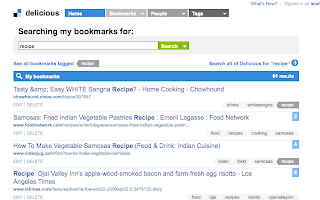
  • Online bookmarks can be done a variety of ways as well. I like the free social bookmarking application delicious for my recipe bookmarks, because it is easily searchable by keyword and it can be accessed from anywhere. I use delicious to save my recipes and tag them with basic keywords so I can see them all in one place if I want: “recipes, food, cooking.” Then I add others as necessary to help me find a specific recipe again, such as “lemon, madeleines, baking, cookies, tea cookies” for a madeleine recipe. 
  • I don’t bother with the “favorites” feature that many cooking websites have, where you can sign up for an account and keep track of favorites recipes through it. Retrieving a recipe would then require you go to that website, sign in, and access your favorites, rather than simple typing in a keyword to your delicious account and clicking on the link when it comes up. The only time an account would be really useful is if you are on a particular site a lot, and want to interact socially with the other users by leaving comments, etc.
  • Once you have found the recipe you are looking for on your computer or in your bookmarks, you can print it and take it to the kitchen, bring your laptop with you if you are brave enough to have ingredients near your keyboard, or you can call the recipe up on a handheld electronic device. I have an iPod Touch, so I can email myself the link to a recipe and call it up on the device once I'm in the kitchen. There are also recipe-related iPhone/iPod Touch applications that can be downloaded for free, such as epicurious.com's mobile app.
Now we've covered the basics of recipe organization, give your recipe collection some attention and let me know what works, and what doesn't, for you!

Screenshots from epicurious.com and delicious.com. 

Lelah Baker-Rabe is a Los Angeles-based professional organizer. To discuss your organization needs, call her at 818.269.6671 or email lelah@lelahwithanh.com 

Tuesday, June 2, 2009

How to organize recipes: part two

After going over ideas for organizing cookbooks, we're moving on to...

Loose Recipes

I have recipes from magazines, newspapers, emails, newsletters and food packages. I have hand written recipes from relatives, photocopied recipes with handwritten annotations from relatives and homemade cookbooks from relatives. Recipes come to us in all shapes and sizes, and putting them in some kind of order can be daunting.

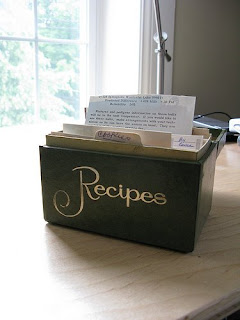
The little index-card sized recipe boxes are pretty to look at, but require rewriting recipes to fit on the appropriate cards. Definitely too much work. Even if you had a container that held all of these recipes perfectly, then the question is, how to you file them? By ingredient (meat, rice, vegetables, fish)? By course (breakfast, appetizer, dessert)? In this day and age, you could even organize them by chef (Jamie Oliver, Paula Deen), by origin (Martha Stewart Living, Gourmet, The New York Times Magazine), or by audience (vegetarian, vegan, raw). Not to mention family-passed-down recipes. Plus, there’s another designation: those tried and true favorites that you practically know by heart, the ones you tried before and worked, but aren’t in the regular rotation, and the recipes you want to try one day, when you get around to buying coriander seeds.

I’m beginning to think an entire book could be written on organizing recipes! Let’s just say that the ultimate way you organize your recipes is up to you. The important thing is that you create a system through which you can actually find the recipe you are looking for when you need it. Here are some suggestions:

  • Toss any recipe that you tried and hated, or will never try. (Less to organize later.)
  • Decide how you want to organize your recipes and sort them accordingly. I have mine sorted by broad categories (Meat, Vegan, Dessert, Soups), and then have a couple of sub categories (Cookies, Duck). Of course, many recipes will belong to more than one category, but don’t agonize over it. Just put it in the category where you think you’d most likely look for it in a month or two.
  • Assess your space and decide on a container. Do you have cookbooks and loose recipes and want to keep them together? In that case, my suggestion is getting a binder or magazine holder that can be filled with clear plastic sleeves and maybe even dividers with labels to hold your recipes. Then the entire thing can be shelved like a book. Do you not have room for the loose recipes on your bookshelf and want something decorative in the kitchen? In that case, you might want to try a recipe box.
  • Once the recipes are filed away (with room add more in the future), test the system by looking for a few recipes and seeing if you can find them easily. Have a family member try as well. It would be handy if your kids could find the macaroni and cheese recipe in the pasta section of your recipe binder as easily as you can!

Click here for one more post on organizing electronic recipes!


Lelah Baker-Rabe is a Los Angeles-based professional organizer. To discuss your organizational needs, call her at 818.269.6671 or email lelah@lelahwithanh.com
Visit her website at http://www.lelahwithanh.com/

6/11/09 update: I found out about a product called Recipe Nest via the Need Another You organizing blog. This is a binder-like product that apparently makes it easy to store paper-based recipes. I like the bright colors it comes in, and the fact that it is pretty spill-proof and can be stored on a shelf with your books. The site for the company that makes it, Recipe Relish, has more info, but it is made with Flash so I can't deep link to the most useful information. I haven't used this product myself, but it might be work checking out.

Monday, June 1, 2009

How to organize recipes: part one

Recipe organization is one of those areas where there as many solutions as people. I’ve yet to meet someone who organized her recipes exactly like anyone else. I think the main issue is that recipes come in many forms, whether bound in cookbooks, loose in an infinite number of shapes and sizes, or stored somewhere on your computer. If you don’t have any system at all, except maybe a drawer stuffed to the gills with paper, or a bookshelf loaded with dog-eared cookbooks, here are some suggestions to get things onto organized footing. Since this is a pretty in-depth topic, I’ve decided to create three separate posts for the three main recipe formats: cookbooks, loose recipes and electronic ones.

Cookbooks

  • First of all, donate or sell any cookbook that you never make recipes from.
  • Second, organize what's left however you tend to set up your books (by author, binding type, etc). I like to organize my cookbooks by subject, from general to specific. That means I have The Joy of Cooking and The Bon Appetit Cookbook on one end and Citrus Cookbook and Pancakes: From Morning to Midnight on the other.
  • Thirdly, if there is a big book taking up a lot of space and you only use a couple of the recipes in it, remove, scan or photocopy those recipes and get rid of the book. It’s just taking up space.
  • Fourth, the remaining books need to have a system for finding frequently used or "want to try" recipes. This system could be as simple as a Post It note, page marker/flag or book mark on which you write a note that can be seen from the outside of the book to remind you what’s on that page. The note you write yourself shouldn’t necessarily match the title of the recipe; make it the name you remember the recipe by (e.g.: Spicy Ribs instead of Roasted Asian-Spiced Pork Ribs).
Cookbook Tips

  • Tip: If you’re an exuberant cook and don’t want to have to worry about getting ingredients all over your cookbook pages, photocopy a working copy of a recipe and leave the book safely shelved while you are working.
  • Extra tip: If you have a cookbook collection, you may not want to put anything with adhesive to mark your recipes, since the adhesive can damage the book over time. Use slips of paper instead.
  • Super extra recipe tip: Whenever I make a recipe, I mark the date I made it and any notes to myself in pencil on the recipe. It helps when I’m looking for a chocolate sauce recipe if the one I find in the Bon Appetite cookbook has a note reminding me I tried it two years ago and it didn’t turn out very well. 
Tune in later this week for parts two and three of how to organize recipes!

Creative Commons cookbook photo posted to flickr by LollyKnit